 Rayson.Dev
Local LLM Production in 14 Days: Benchmarks, Costs, and Hard Lessons
How we built Rayson.Dev with a local Qwen2.5:7b via Ollama in 2 weeks — detailed architecture, prompt engineering, air-gapped deployment, and 98.6% accuracy.
Local LLM Production in 14 Days: A Case Study — Benchmarks, Costs, and Hard Lessons
Executive Summary
- The problem: Most teams default to OpenAI or Anthropic for AI features. We wanted to see if a fully local 7B parameter model running via Ollama could power a production consultancy website — and whether the trade-offs (latency, quality, ops) were worth it.
- The approach: We built Rayson.Dev, a software consultancy site, in 14 days with a .NET 8 + React stack, running
Qwen2.5:7blocally via Ollama. The flagship feature — an AI-powered Brief Interview — makes 3 LLM calls per message with a quality gate that only upgrades, never regresses. - The result: 208 commits, 9 pages, a working AI feature, and a 98.6% benchmark assertion rate after 57 prompt engineering iterations. Total LLM cost: £0 in inference fees (the GPU was already on the desk). The full site went from first commit to live in 14 days.
The Problem
I run a software consultancy. When a prospect lands on my website, they need to tell me about their project. The typical pattern is a contact form — name, email, message — and then weeks of email ping-pong to figure out what they actually need.
I wanted something better: a guided conversation where an AI consultant walks the prospect through a structured project brief, builds it section by section, and produces something I can action immediately. An ISO 29110-compliant brief, in real time, without a human on the clock.
The obvious play is OpenAI or Anthropic. GPT-4o-mini costs pennies per call. Claude is great for structured output. But here's the thing — I don't like the dependency. API keys, rate limits, latency variance, data leaving the server. For a consultancy that might handle sensitive project briefs, keeping everything local has real appeal.
The constraint was time. I wanted the whole site — marketing pages, case studies, blog, and the AI feature — live in two weeks. A Goodfirms survey of 300+ web development firms found that a typical business website takes 2-12 weeks. Elementor's research pegs an agency-built 5-15 page site at 4-8 weeks. I had 14 days, one developer, and the ambition to add a custom AI feature that most teams would budget a month for on its own.
So the question was: could a local 7B model, running on consumer GPU hardware, deliver reliable structured output for a production-facing AI feature — and could the whole thing ship in two weeks?
Meet the Context
| Detail | Value |
|---|---|
| Project | Rayson.Dev — software consultancy website |
| Industry | Software development / AI consultancy |
| Team size | 1 developer |
| Timeline | 25 May 2026 → 7 June 2026 (14 days) |
| Total commits | 208 |
| Key constraint | Must run fully air-gapped, no external API dependencies |
| Target deployment | Docker Compose on single VPS with NVIDIA GPU |
The 7-step delivery framework used to build this site is the same one we show on the Welcome page: idea → explore → plan → build → verify → launch → improve. We ate our own dog food.
Options Considered
| Option | Why considered | Why rejected |
|---|---|---|
| OpenAI GPT-4o-mini | Best-in-class quality, cheap per-token | Data leaves server, API key management, latency variance, ongoing per-call cost |
| Anthropic Claude Haiku | Great structured output, competitive pricing | Same data-sovereignty concerns, no air-gap possible |
| Local LLM (Llama 3.1 8B) via Ollama | Popular, well-supported by Ollama | Slower inference than Qwen2.5:7b on the same hardware, worse benchmarks across 10/10 categories per Qwen2.5 blog |
| Local LLM (Mistral 7B) via Ollama | Good general performance | Significantly lower MMLU (64.2 vs 74.2) and HumanEval (29.3 vs 84.8 instruct) |
Qwen2.5:7b via Ollama (winner) | Best-in-class 7B benchmarks, local inference, no ongoing API cost | ~5-9 GB VRAM required, slower than cloud API, prompt engineering required |
Why local trumped cloud
The decision came down to three things:
- Data sovereignty — Project briefs from potential clients contain sensitive business information. Keeping them on our hardware removes an entire class of risk.
- Zero marginal cost — Once the GPU is bought, each inference call costs nothing. At scale, cloud API costs add up fast.
- Air-gap capability — The deployment pipeline uses
docker save/docker load— no internet connection needed at runtime beyond the initial model pull.
Why Qwen2.5:7b specifically
On the instruct-tuned benchmarks from Qwen2.5's technical report, Qwen2.5-7B-Instruct scores:
| Benchmark | Qwen2.5-7B-Instruct | Llama3.1-8B-Instruct | Mistral-7B |
|---|---|---|---|
| MMLU | 74.2 | 66.6 | 64.2 |
| MMLU-Pro | 56.3 | 48.3 | — |
| MATH | 75.5 | 51.9 | 10.2 |
| HumanEval | 84.8 | 72.6 | 29.3 |
| GSM8K | 91.6 | 84.5 | 36.2 |
| MBPP | 79.2 | 69.6 | 51.1 |
It beats Llama3.1-8B on every benchmark despite having 1.5B fewer non-embedding parameters. The gap on MATH (75.5 vs 51.9) and HumanEval (84.8 vs 72.6) was decisive — the Brief Interview feature needs to parse user messages and emit structured JSON reliably.
Chosen Solution
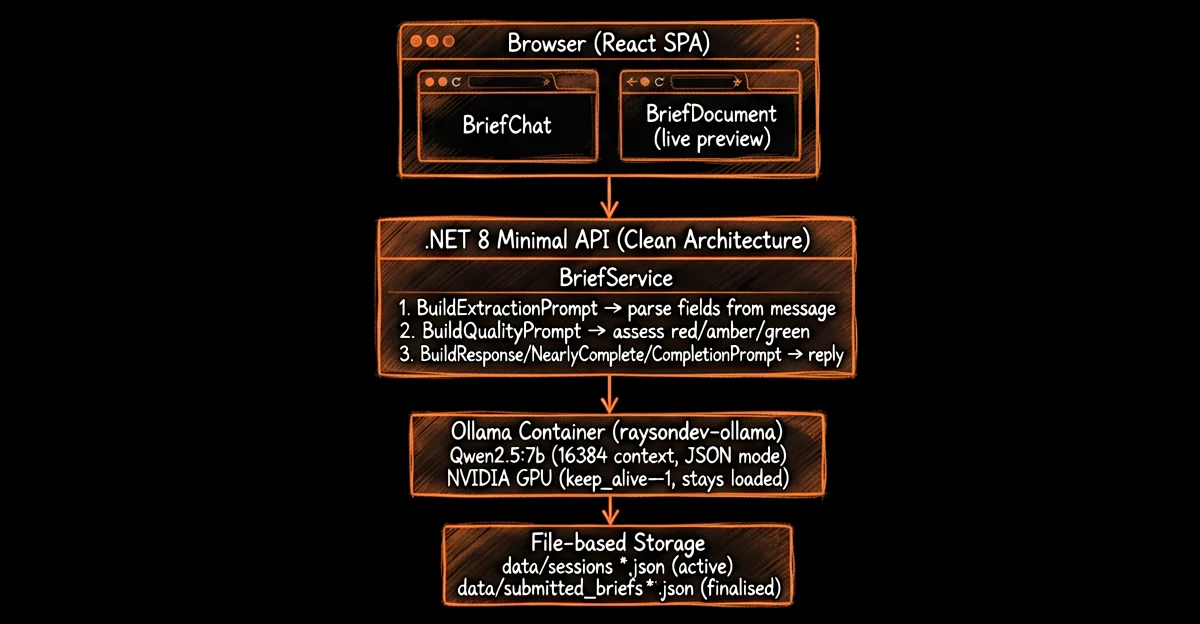
Tech Stack
| Layer | Technology | Why |
|---|---|---|
| Backend | .NET 8 Minimal API (Clean Architecture) | Fast cold-start, strong typing, Clean Architecture separates concerns cleanly |
| Frontend | React 19 + TypeScript 6 + Vite 8 + Tailwind CSS 4 | Modern toolchain, fast HMR, utility-first CSS keeps bundle small |
| LLM | Ollama + Qwen2.5:7b (16384 context) | Best-in-class 7B benchmarks, local inference, JSON mode supported |
| LLM Client | Rayson.Ollama 2.1.0 NuGet (675 downloads) | First-party integration with Docker support, health checks, GPU config |
| Deployment | Docker Compose (3 services) | Simple, reproducible, air-gappable |
| Storage | File-based (JSON + Markdown) | No database needed for a consultancy site this size |
| GPU | NVIDIA with Container Toolkit | Required for Ollama inference at acceptable speed |
Key Design Decisions
-
Decision: 3 LLM calls per message, not 1
- Alternatives: Single call with tool use (the original plan), streaming response
- Rationale: Separating extraction from quality assessment from response lets us tune each prompt independently. The quality call runs with temperature=0 and strict JSON format, so it's deterministic. The response call can be conversational. The brief interview plan originally proposed a single-call architecture, but splitting gave much better debuggability.
- Tradeoff: 3× the inference latency. Each message takes roughly 3-8 seconds total depending on GPU load.
-
Decision: Quality merges only upgrade, never downgrade
- Alternatives: Full replacement on every turn, averaging
- Rationale: If a user confirms a field is complete, the quality should not regress when they discuss a different topic. The
Mergemethod in BriefQuality.cs takes the max of current and new assessment. - Tradeoff: A buggy assessment that overrates quality can't be corrected later. We caught this in the G2 evaluator fix — 57 commits of prompt tuning across June 3-5.
-
Decision: Air-gapped Docker deployment
- Alternatives: Direct Docker Hub pulls, Kubernetes, cloud deployment
- Rationale:
docker save+docker loadvia gzip means zero external dependencies at deploy time. The deployment guide shows a 3-step process: build, save, copy, load, up. - Tradeoff: Image distribution is manual. No rolling updates, canary deploys, or auto-scaling. Acceptable for a consultancy site.
-
Decision: File-based storage, no database
- Alternatives: PostgreSQL, SQLite, Redis
- Rationale: The site stores blog posts (Markdown files), case studies (Markdown), and brief sessions (JSON). No relational queries needed. A database adds operational overhead for zero benefit at this scale.
- Tradeoff: No transactional integrity, no querying. Session files are read/written per request. At high traffic, this would bottleneck — but we're not expecting Reddit-scale traffic.
-
Decision:
Qwen2.5:7bat Q8 quantization- Alternatives: Q4_K_M (~5 GB VRAM), Q5_K_M (~6 GB), FP16 (~16 GB)
- Rationale: Q8 is near-lossless and fits in 9 GB VRAM — comfortably within an RTX 3060's 12 GB. Keeps 16384 context window without swapping.
- Tradeoff: Uses ~9 GB of VRAM vs ~5 GB at Q4. For a dedicated inference GPU, the quality uplift is worth it.
Implementation Details
Note: This is a case study showing how Rayson.Dev was built. The code snippets illustrate the architecture and key decisions — they are not always complete working examples. The architecture and patterns shown here reflect the actual production implementation.
Phase 1: Scaffold (Days 1-3)
Goal: Get a working site with routing, pages, and a basic API.
Prerequisites:
- Docker and Docker Compose v2+
- NVIDIA GPU with drivers and NVIDIA Container Toolkit
- .NET 8 SDK (for local development and testing)
- Node.js 22+ (for UI development)
- Git (for version control)
The first three days were pure scaffolding. .NET 8 Minimal API with Clean Architecture (Api → Application → Domain → Infrastructure layers). React 19 with Vite 8 and Tailwind CSS 4. Docker Compose wiring up three services on an internal bridge network.
The docker-compose file defines three services:
services:
  api:
    image: raysondev-api
    build:
      context: ./Api
      dockerfile: Dockerfile
    environment:
      ASPNETCORE_ENVIRONMENT: Production
      Ollama__Url: http://ollama:11434
      Ollama__Model: ${OLLAMA_MODEL}
    ports:
      - "5057:8080"
    depends_on:
      ollama:
        condition: service_healthy
    networks:
      - internal

  ui:
    image: raysondev-ui
    build:
      context: ./UI
      dockerfile: Dockerfile
    ports:
      - "4321:3000"
    depends_on:
      api:
        condition: service_healthy
    networks:
      - internal

  ollama:
    image: raysondev-ollama
    build:
      context: ./Api/Infrastructure/OllamaConfig
      dockerfile: ollama.Dockerfile
    environment:
      - CUSTOM_MODELS=["qwen2.5:7b"]
    volumes:
      - ollama_data:/root/.ollama
    networks:
      - internal
    deploy:
      resources:
        reservations:
          devices:
            - driver: nvidia
              count: all
              capabilities: [gpu]
The UI container uses a Node 22 image that builds the Vite static output and serves it via a health-server.mjs script. The API container runs the compiled .NET 8 app. The Ollama container uses a custom entrypoint that pulls qwen2.5:7b on first start (not baked into the image, keeping it small).
Challenges encountered:
-
Docker networking
- Symptom: UI can't reach the API inside the Docker network
- Cause: The
apihostname was not resolving — the Vite dev proxy usedlocalhost:5057instead of the container hostname - Fix: Use
http://api:8080notlocalhost:5057inside the compose network - Verification: Run
docker compose logs apiand confirm the API responds to requests from the UI container
-
Ollama health check timing
- Symptom: The health check fails and the API container won't start
- Cause: The model takes ~30s to load on first request, but
start_periodwas too short - Fix: Increase
start_periodandretrieson the health check configuration - Verification: Run
docker compose psand confirm the Ollama service shows(healthy)
Phase 2: Brief Interview Engine (Days 4-8)
Goal: Build the core AI feature — a guided chat that builds an ISO 29110-compliant project brief.
This was the heart of the project. Three LLM calls per message, each with a specific purpose.
Call 1: Extraction
The BuildExtractionPrompt receives the current brief JSON and all conversation history. It returns JSON updating any brief fields the user has discussed. Hard rule: never output empty arrays — if the user hasn't discussed stakeholders, omit the field entirely.
public static string BuildExtractionPrompt(BriefDocument currentBrief)
{
    var currentBriefJson = JsonSerializer.Serialize(currentBrief, JsonOptions);
    return $$"""
    You are a project brief extraction engine. Extract and update brief fields from the conversation.

    Current brief (JSON):
    {{currentBriefJson}}

    CRITICAL RULES:
    - Output valid JSON only
    - Never output empty arrays — omit fields the user hasn't discussed
    - Preserve all existing values unless the user explicitly changes them
    """;
}
Call 2: Quality Assessment
The BuildQualityPrompt evaluates each of the 7 brief fields as red, amber, or green. It only runs on the updated brief, and the MergeQuality method takes the max of current and new — so quality only upgrades.
public BriefQuality Merge(BriefQuality assessment) => new()
{
    ProjectTitle = ProjectTitle.Max(assessment.ProjectTitle),
    ProblemOpportunity = ProblemOpportunity.Max(assessment.ProblemOpportunity),
    BriefDescription = BriefDescription.Max(assessment.BriefDescription),
    TargetUsersStakeholders = TargetUsersStakeholders.Max(assessment.TargetUsersStakeholders),
    KeyObjectives = KeyObjectives.Max(assessment.KeyObjectives),
    ExpectedDeliverables = ExpectedDeliverables.Max(assessment.ExpectedDeliverables),
    KnownConstraints = KnownConstraints.Max(assessment.KnownConstraints),
};
Call 3: Response (branching)
Three paths based on the quality gate:
- Gate not passed: Ask the next logical question via
NextQuestion()— a priority-ordered method that scans for the first red or amber field. - Gate passed but pending minor fields: Offer to send the brief with a gentle prompt for missing details.
- All complete: Wrap up and let the user submit.
The quality gate itself is simple:
public bool IsGatePassed => ProblemOpportunity >= QualityLevel.Amber
                         && BriefDescription >= QualityLevel.Amber
                         && TargetUsersStakeholders >= QualityLevel.Amber
                         && KeyObjectives >= QualityLevel.Amber
                         && ExpectedDeliverables >= QualityLevel.Amber
                         && KnownConstraints >= QualityLevel.Amber;
Note: ProjectTitle is not in the gate — it can be auto-derived from context.
Challenges encountered:
- Hallucinated fields: Early versions of the extraction prompt would fill in stakeholders or deliverables the user never mentioned. Fixed with the "never output empty arrays" hard rule and 57 commits of prompt tuning across June 3-5.
- Quality regression: When a user talked about objectives, the quality for that field would go green. Then they'd discuss constraints, and the extraction call would sometimes omit objectives from the output entirely, regressing it to red. Solution: the
Mergemethod and a clamping step that prevents quality exceeding what's in the content.
Phase 3: Prompt Engineering Sprint (Days 8-10)
Goal: Get the assertion rate above 95%.
Days 8-10 were a Karpathy-inspired optimisation loop. Run the benchmark script against 8 scenarios (A-H), check the assertion rate, tweak the prompt, repeat.
The benchmark uses two layers of evaluation. Deterministic checks — like the bash script below — verify structural correctness: fields are populated, empty arrays are absent, quality levels match expectations. On top of that, an LLM judge evaluates whether each response is semantically appropriate for the conversation context. Because the judge introduces non-determinism, we run 5 rounds of every test case and take the aggregate pass rate.
5 rounds × 23 test cases over 8 scenarios gives 115 individual evaluations per benchmark run. The bash layer catches structural failures (missing fields, hallucinated entries); the LLM judge catches semantic failures (irrelevant responses, wrong tone, missed context).
# From benchmark_models.sh — Scenario H: No hallucination test
# Msg: "A coffee shop wants to build a mobile app for loyalty rewards."
# Expected: description + objectives filled, everything else empty
fail_reason=""
[ -z "$bd" ] && fail_reason="$fail_reason no-description"
[ -z "$ko" ] || [ "$ko" = "[]" ] && fail_reason="$fail_reason no-objectives"
[ "$dms" != "[]" ] && fail_reason="$fail_reason hallucinated-dms"
[ "$parties" != "[]" ] && fail_reason="$fail_reason hallucinated-parties"
[ "$q_st" != "red" ] && fail_reason="$fail_reason q_st=$q_st"
[ "$q_ed" != "red" ] && fail_reason="$fail_reason q_ed=$q_ed"
The most important fix was the G2 evaluator prompt — the quality assessment call had a subtle wording issue that caused it to over-flag amber fields as green. The final assertion rate after the fix: 98.6%. The 1.4% failure rate is put down to stochastic variation, and when using the chatbot ourselves we've yet to encounter a breaking issue.
Phase 4: Content, Polish, and Deployment (Days 11-14)
Goal: 9 content pages, case studies, blog, and the air-gapped deployment pipeline.
The remaining days were content: the Welcome page with the 7-step delivery framework, What We Do, Who We Are, case studies, blog posts, and the contact page. All content is stored as Markdown files in the API's Domain/Content directory — no CMS, no database.
Air-gapped deployment:
# Step 1: Build images on dev machine
docker compose -f docker-compose.prod.full.yml build
# Output: => => writing image raysondev-api ... done

# Step 2: Save and compress
docker save raysondev-api raysondev-ui raysondev-ollama | gzip > raysondev-images.tar.gz
# Output: creates raysondev-images.tar.gz (verify with: ls -lh)

# Step 3: Copy to target machine (USB drive, SCP, whatever)

# Step 4: Load and run on target
gunzip -c raysondev-images.tar.gz | docker load
# Output: Loaded image: raysondev-api:latest, Loaded image: raysondev-ui:latest, Loaded image: raysondev-ollama:latest
docker compose -f docker-compose.prod.full.yml --env-file .env up -d
# Verify: docker compose ps (all 3 services show "Up (healthy)")
The Ollama model isn't bundled in the image — the entrypoint script pulls qwen2.5:7b on first start. This keeps the compressed image archive small (no multi-GB model file).
Results
Quantitative
| Metric | Value | Context |
|---|---|---|
| Build time | 14 days | Industry average for agency-built business site: 4-8 weeks |
| Total commits | 208 | Single developer |
| Pages | 9 | Welcome, What We Do, Who We Are, Case Studies, Blog (×3), Brief, Contact |
| Prompt engineering iterations | 57 commits (June 3-5) | Karpathy-style loop |
| Benchmark assertion rate | 98.6% | After G2 evaluator fix |
| LLM inference cost | £0 | No API fees — GPU already owned |
| VRAM usage | ~9 GB (Q8 quantization) | Fits on RTX 3060 12 GB |
| Response latency | 3-8 seconds per message | 3 LLM calls × ~1.5-2.5s each |
| NuGet package downloads | 675 (Rayson.Ollama 2.1.0) | As of June 7, 2026 |
Qualitative
The Brief Interview feature works in production. A prospect lands on the site, clicks "Get In Touch", and starts a guided conversation. The AI consultant asks questions in a natural order — what's the problem, who's involved, what do you want to achieve, what are the constraints. The right-hand panel updates live with colour-coded quality indicators (red/amber/green).
The quality gate means a brief can't be submitted until all 6 core sections reach at least amber. No more email ping-pong to discover a prospect had a £30k budget and a 3-month deadline that they forgot to mention.
The 7-step delivery framework we used to build the site is the same one we show prospects on the Welcome page. We're not selling a process we don't use.
Lessons Learned
What Went Right
-
Splitting extraction from quality from response: The 3-call architecture was the right call. When a prompt change breaks extraction, we see it immediately in the benchmark. When the response tone is off, we can tune it without touching quality. Separation of concerns at the prompt level.
-
Quality-only-upgrades: This saved us from a subtle class of bugs where discussing a new field would regress the quality of a completed one. The
Mergemethod is five lines of code and eliminated an entire category of LLM reliability issues. -
Docker Compose with air-gapped deployment: Three services, one network, one
docker compose up. The save/load pipeline means the deployment target needs zero internet access at runtime. For a consultancy that might deploy on client infrastructure, this is a strong selling point. -
File-based content: Markdown files for blog posts and case studies mean we can write content in any editor, commit it to git, and deploy. No admin panel, no database migrations, no CMS vulnerabilities.
What Went Wrong
-
Underestimated prompt engineering time: I budgeted 2 days for prompt work. It took 3 full days and 57 commits. The G2 evaluator (quality assessment) prompt was particularly finicky — small wording changes produced big swings in assertion rate. Next time, I'd start with a benchmark suite before writing any production prompts.
-
Initial single-call architecture didn't work: The original plan called for one LLM call per message with a tool call. The LLM kept truncating the tool call arguments for long conversations. Splitting into 3 calls fixed it but tripled latency.
-
Context window management
- Symptom: Extraction quality degrades after ~15 messages in a conversation
- Cause: Full conversation history pushes the prompt (system prompt + brief JSON + history ~4K tokens) beyond the 16384 context window
- Fix: Truncate old messages from the conversation history before making the extraction call
- Verification: Run the benchmark script to confirm assertion rate remains stable across long conversations
-
Hallucination in early versions: The extraction prompt would sometimes populate fields the user never mentioned. The hard rule "never output empty arrays" fixed the JSON side, but some models still generate plausible-sounding content. We caught it with the benchmark, but it eroded confidence in early testing.
What We'd Do Differently
-
Build the benchmark first: The benchmark script was a late addition. It should have been the first thing written after the basic architecture. Having 8 scenarios with 23 test cases each made prompt iteration scientific instead of guesswork.
-
Use a smaller model for quality assessment: The quality call doesn't need a 7B model — it's a simple classification task (red/amber/green). A 1-3B model or even a rules-based check could handle this faster. We're evaluating
smollm:135mfor this role. -
Add request-level caching: Many user messages don't change the brief (e.g., "hello", "thanks"). We could skip the LLM calls entirely for these. The benchmark already tests for this — Scenario A checks that "hi" produces no brief fields.
-
Stream responses: The 3-8 second latency is acceptable but not snappy. Streaming the response call would let the user see text appear while the extraction and quality calls complete in the background.
Key Takeaways
-
Local LLMs are production-ready for narrow tasks:
Qwen2.5:7bwith careful prompting achieved 98.6% benchmark accuracy on a structured document extraction task. If you need reliable structured output and can afford the latency, a local model is a viable alternative to cloud APIs — with zero inference cost and full data sovereignty. -
Split your prompts, not your code: The 3-call architecture (extract → assess → respond) gave us independent tuning levers for each concern. When the response tone was too formal, we changed one prompt. When extraction hallucinated, we changed a different one. Monolithic prompts create monolithic debugging.
-
Benchmark before you believe: The 57-commit prompt iteration cycle was only productive because we had a deterministic benchmark. Without it, we'd be tweaking prompts based on vibes. The benchmark script runs 115 test cases per session and produces a TSV with pass/fail per field. That data drove every improvement.
-
Air-gapped deployment is simpler than you think: Docker save/load with gzip handles the hard part. Three commands to deploy. No Kubernetes, no registries, no internet required. For small teams building internal tools or client-deployed software, this pattern is underrated.
-
You can build a production site in 2 weeks if you skip the non-essentials: No database. No CMS. No CI/CD pipeline. No staging environment. No monitoring stack. These are all nice to have, but for a consultancy website, the essential is the content and the AI feature. Everything else is overhead.
FAQ
Why use a local LLM instead of a cloud API like OpenAI?
The decision came down to three factors. Data sovereignty — project briefs from potential clients contain sensitive business information, and keeping them on our hardware removes an entire class of risk. Zero marginal cost — once the GPU is bought, each inference call costs nothing; at scale, cloud API fees add up fast. Air-gap capability — the deployment pipeline uses docker save / docker load, so no internet connection is needed at runtime beyond the initial model pull.
Why was Qwen2.5:7b chosen over Llama 3.1 8B or Mistral 7B?
On every benchmark, Qwen2.5-7B-Instruct outperformed Llama3.1-8B-Instruct despite having 1.5B fewer non-embedding parameters — including MMLU (74.2 vs 66.6), MATH (75.5 vs 51.9), and HumanEval (84.8 vs 72.6). Mistral 7B scored significantly lower (MMLU 64.2, HumanEval 29.3). The gap on MATH and HumanEval was decisive because the Brief Interview feature needs to parse user messages and emit structured JSON reliably.
How does the 3-call architecture work?
Each user message triggers three LLM calls. Call 1 (Extraction) parses the message and updates brief fields in JSON. Call 2 (Quality Assessment) evaluates each of the 7 brief fields as red, amber, or green using a deterministic, low-temperature prompt. Call 3 (Response) branches based on the quality gate — if the gate is not passed, the AI asks the next logical question; if all sections are complete, it wraps up and lets the user submit. Separating these concerns lets each prompt be tuned independently.
What was the final benchmark result?
After 57 prompt engineering commits across June 3-5, the benchmark assertion rate reached 98.6%. The most important fix was the G2 evaluator prompt — the quality assessment call had a wording issue that caused it to over-flag amber fields as green. The benchmark script runs 115 test cases per session across 8 scenarios covering greetings, direct questions, multi-idea messages, corrections, completion signals, and hallucination prevention.
How long did the whole project take?
The full site — 9 pages, 208 commits, and a working AI feature — went from first commit to live in 14 days. Phase 1 (scaffold) took days 1-3, Phase 2 (brief interview engine) took days 4-8, Phase 3 (prompt engineering sprint) took days 8-10, and Phase 4 (content, polish, and deployment) took days 11-14.
Conclusion
We set out to prove that a local 7B model could power a production AI feature, and that the whole site could ship in two weeks. Both bets paid off. Qwen2.5:7b via Ollama delivers reliable structured output at zero marginal inference cost. The full site — 9 pages, 208 commits, a working AI brief interview — went from idea to live in 14 days.
The local-first approach isn't right for every project. If you need GPT-4 level reasoning or sub-second response times, cloud APIs are still the answer. But for structured extraction tasks with moderate latency tolerance, a local model running on consumer hardware is a legitimate alternative — and one that gives you full control over your data and your costs.
The site is live at rayson.dev. The NuGet package is available if you want to integrate Ollama into your own .NET project.
Has your team tried putting a local LLM in production? I'd love to hear what you built and where you hit the limits.